🎛️ Introduction
Welcome to Cloudmax Breeze, the AI-powered vocal FX plugin designed to enhance your vocal tracks with minimal effort.
With neural-modeled amp simulations, a custom reverb, tonal EQ, and a glue compressor, it delivers professional-quality results for music, podcasts, or voiceovers.
What is Cloudmax Breeze?
Cloudmax Breeze is a vocal enhancer that combines AI-driven automation with powerful effects, including:
-
Neural-Modeled Heat Simulation – brightens vocals with optional saturation or overdrive
-
Custom Vocal Reverb – adds depth and presence
-
Glue Compressor & Crisp EQ – smooth dynamics and polished highs
-
Breeze Macro Knob – a single knob that controls all parameters proportionally
🖥️ Installation & Uninstallation
Installation (macOS & Windows)
-
Download the installer from the official website.
-
Run the installer and select the required plugin formats (VST3, AU, AAX).
-
Launch your DAW to verify installation.
-
Enter the serial number found in your Karanyi Sounds account.
Uninstallation (macOS)
-
Navigate to
Library/Audio/Plug-Ins. -
Delete the Cloudmax Breeze files (VST3, AU).
-
Empty Trash.
Uninstallation (Windows)
-
Open Control Panel > Programs and Features
-
Select Cloudmax Breeze and click Uninstall
🧩 Plugin Functions
Main Interface
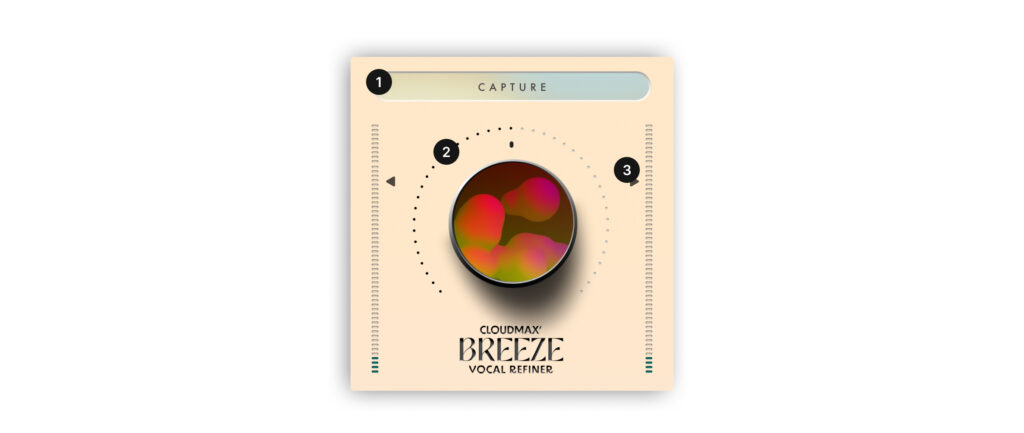
-
Capture: AI listens to your audio input and auto-adjusts plugin settings
-
Breeze Knob: Main macro knob – sets overall effect intensity
-
Output Gain: Adjusts the plugin’s final output volume
Advanced Controls
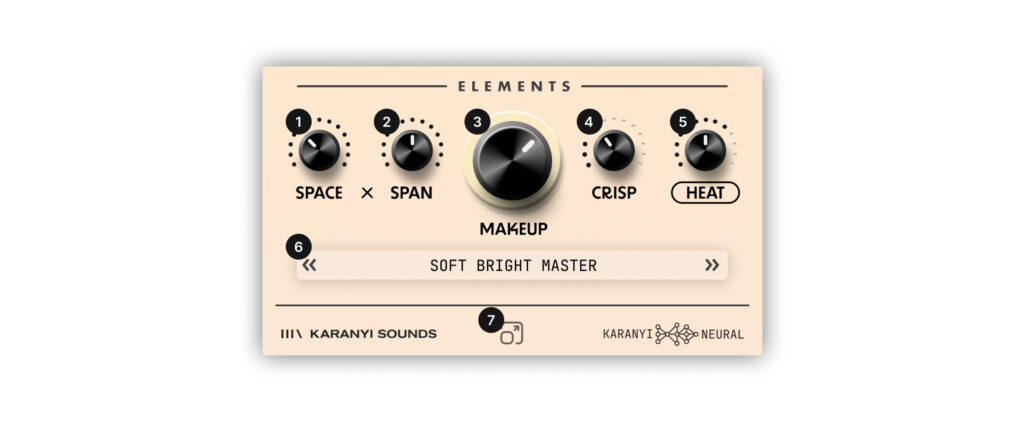
-
Space – controls reverb amount
-
Span – adjusts reverb feedback/tail
-
Makeup – glue compression with gain compensation
-
Crisp – enhances clarity with high-end EQ
-
Heat – neural-modeled saturation, includes on/off switch
-
Preset Bar – browse, save, and load presets
-
Scale – resize GUI up to 150%
Visual Feedback
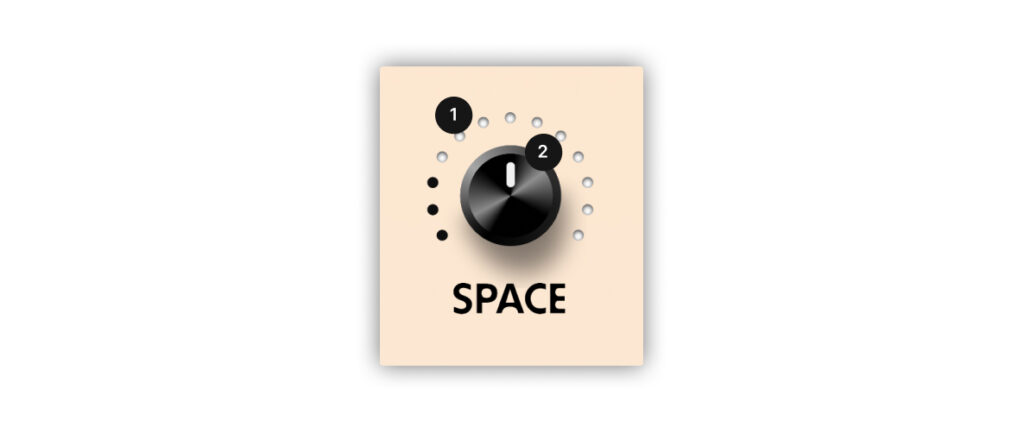
-
Outer Rim Indicators: show parameter intensity based on Breeze knob position
-
Control Buttons: define maximum range for each parameter
🎙️ Use Cases
Polished Vocals
Use Capture, then adjust Crisp and Heat to enhance vocal tone.
Rich Ambience
Adjust Space and Span for cinematic or ballad-style reverb.
Creative Saturation
Turn on Heat and tweak presets to get unique textures for vocals.
🎛️ Other Creative Use Cases
-
Smooth Reverb for Instruments – Add Space and Span to piano or acoustic guitar
-
Distorted Vocals – Crank Heat for aggressive genres like hyperpop
-
Drum Ambience – Use on snares or kicks for enhanced tails or punch
-
Foley/SFX Design – Add realism to field recordings with reverb and Crisp for texture
✅ Outro
Thanks for using Cloudmax Breeze!
For support, updates, and tutorials, visit:
👉 karanyisounds.com/product/cloudmax-breeze
Happy Producing! 🎶
Comments
0 comments
Article is closed for comments.